
Manufacturer diagnostics
Work with
OEM software.
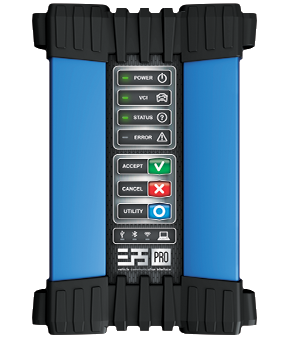
Use the vehicle manufacturer's own diagnostic and programming application with ELP5 PRO-VCI operating as the SAE J2534 communication interface.


- Provider
- Vehicle manufacturer
- Access
- Paid subscription
- Interface standard
- SAE J2534
- VCI
- ELP5 PRO-VCI
OEM software explained
Software created by
the vehicle manufacturer.
OEM applications provide access to manufacturer-specific diagnostics, programming and service procedures.
- 01
Made by the carmaker
The vehicle manufacturer's own diagnostic and programming application, for example ODIS for Volkswagen Group or ISTA for BMW.
- 02
Bought from the carmaker
Licensed by the vehicle manufacturer, usually as a subscription purchased directly through its service portal.
- 03
Runs through ELP5 PRO-VCI
ELP5 PRO-VCI is selected as the J2534 device that connects the manufacturer's application to the vehicle.
Works with
OEM applications tested by Elprosys with ELP5 PRO-VCI.
- [TODO: tested OEM application]
- [TODO: tested OEM application]
- [TODO: tested OEM application]
Functionality depends on the OEM software subscription and on support for the specific vehicle.
Getting access
From the manufacturer portal
to your first session.
The licence and application come from the vehicle manufacturer. ELP5 PRO-VCI provides the standardized connection to the vehicle.
-
Find the carmaker's portal
Use the list below or a directory such as OEM1Stop or ACEA.
Portals → -
Create an account and buy access
Register on the portal and buy a subscription for the period you need.
-
Install the OEM software
Download the application from the portal and install it on your PC. It has its own PC requirements.
-
Select ELP5 PRO-VCI
In the OEM software, choose ELP5 PRO-VCI as the J2534 device. The J2534 driver comes with ELP Pass-Thru Link.
Download ELP Pass-Thru Link →
Official sources
Where to get
OEM software.
Start with an official directory or go directly to the vehicle manufacturer's service portal.
Portal directories
Manufacturer portals in Europe
Carmakers give independent workshops access to repair information and software under Regulation (EU) 2018/858 (opens in a new tab).
- Volkswagen Group erWin erwin.vwgroup-datahub.com (opens in a new tab)
- BMW Group Aftersales Online System aos.bmwgroup.com (opens in a new tab)
- Mercedes-Benz B2B Connect b2bconnect.mercedes-benz.com (opens in a new tab)
- Stellantis (Peugeot, Citroën, DS, Opel) Service Box servicebox-parts.com (opens in a new tab)
- Renault Group New Dialogys newdialogys.renault.com (opens in a new tab)
- Toyota / Lexus TechDoc toyota-tech.eu (opens in a new tab)
- Ford Ford Service Info fordserviceinfo.com (opens in a new tab)
- Hyundai Information for independent operators hyundai.com (opens in a new tab)
Functionality depends on the OEM software subscription and on support for the specific vehicle.